


Sign in to cPanel for the first time
Access your hosting control panel safely, verify the correct login URL, and protect your account credentials.
Before you start
- ROT4 hosting activation details
- A modern browser and trusted connection
- Your cPanel username and password
- Your phone when two-factor authentication is enabled
Open the correct cPanel URL
Use the cPanel link in your activation email, or add /cpanel after your domain. Confirm the connection uses HTTPS.
Path: yourdomain.com/cpanel
Enter the account credentials
Use the cPanel username and password supplied for the hosting account.
Fields: Username and Password
Complete security verification
Enter the current code from your authenticator app when two-factor authentication is enabled.
Two-Factor Authentication
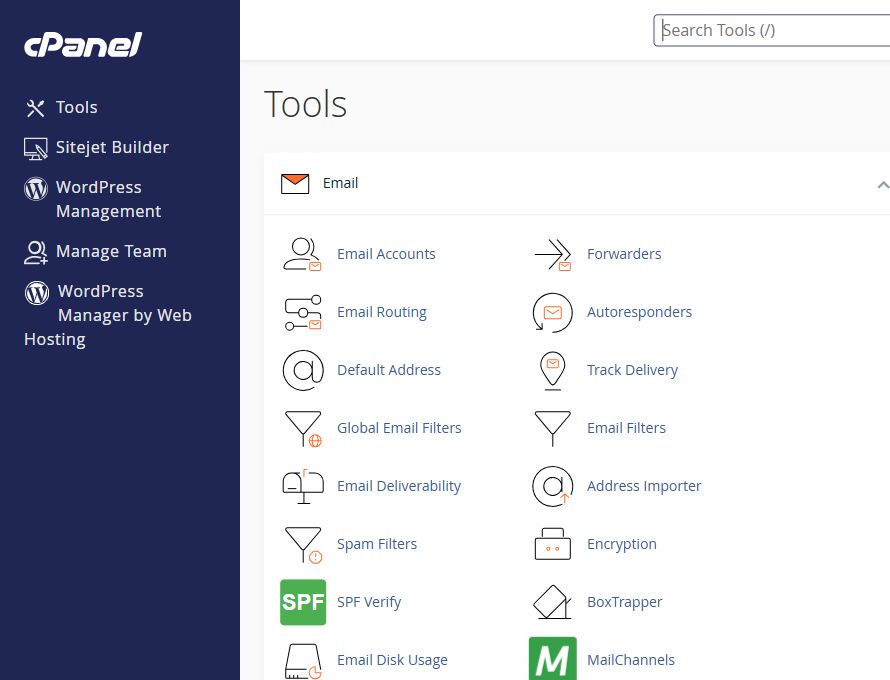
Confirm the dashboard
The dashboard contains Files, Email, Databases, and Domains. Use the top search field to find a tool quickly.
Files • Email • Databases • Domains
Common troubleshooting
| Issue | Solution |
|---|---|
| The login page does not open | Use the server link in the activation email or ask ROT4 to check DNS. |
| The password is rejected | Check keyboard language and spaces, then request secure access recovery. |
| Your IP is blocked | Send your public IP to support so the block can be reviewed safely. |
Need help?
Send the error screenshot and service name to ROT4 support and we will help you complete the setup safely.
