


Before you start
- ✓ Access to cPanel
- ✓ A recent backup
- ✓ The application PHP requirements
- ✓ Time to test pages and forms
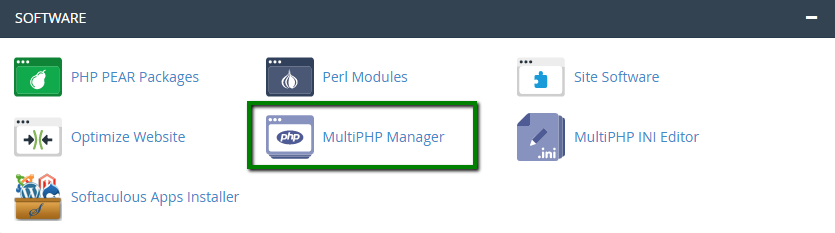
Open MultiPHP Manager
On the cPanel home page, find Software and open MultiPHP Manager. Tool availability can vary by server.
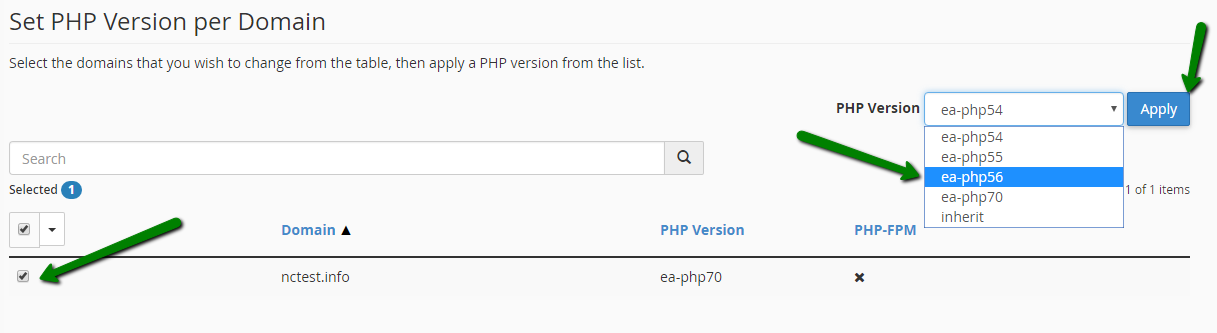
Select the domain, version, and Apply
Check only the target domain, select a supported PHP version, and choose Apply. Confirm the PHP Version column reflects the selection.
Important
Do not select an obsolete PHP release simply to hide an error. Update the application first and never change production PHP without a backup.
Do not select an obsolete PHP release simply to hide an error. Update the application first and never change production PHP without a backup.
PHP is configured safely
Test the public site, admin area, forms, checkout, and email delivery before closing the task.
Primary technical source: Official cPanel documentation
